Hey, I’ve been trying to animate with the latest version of pencil2D but like I’ve seen some kind of bug when trying to copy pasting multiple frames 5 or 7 times, some of the frames I pasted were just blank, is it a bug? have you guys noticed it tho?
Hi LoydMathhew
So to be clear, you’re selecting a bunch of frames and copy/pasting them 5-7 times continuously?
Are you able to reproduce it consistently or does it only happen sometime?
idk man, I just downloaded the latest version in this day tho, I tried it out and yes, I copy pasted multiple frames altogether and when I tried to play the animation some of the frames went blank, I tried checking the frames again and its completley blank
I’m having the same issue. its fine if when the project is simple. but as soon as you get to multiple layers and try to do anything a bit more complex you get random blank frames popping up. really frustrating. i love this software and it has so much potential for creators but this its killing work flow
im also having this same issue. very frustrating to have to redraw frames
The issue that @LoydMathhew describes is almost certainly an issue specific to the timeline copy and paste operation which has already been fixed in the latest nightly builds (Nightly Builds | Pencil2D Animation) and will be available in v0.7.1 when we release it (currently there are some issues blocking the release).
As for @cpanimation and @wolfiereigns, just because you are also experiencing frame wipes does not necessarily mean this is the same issue. If the frames being wiped are not frames that you have pasted using the timeline copy and paste, or are frames that were modified after pasting, then you’re experiencing a different issue than the one that was fixed. It is best to create your own topics and provide as much detail as possible about your system and the circumstances which cause frames to be wiped. If we don’t have enough information to reproduce the issue, it is unlikely we will be able to find the cause of the problem and fix it.
In the mean time, you’re welcome to try the nightly builds and see if that helps with the issues you are experiencing. Just be aware that they have not been tested as thoroughly and may contain new bugs that we are not yet aware of.
I’ve hit this problem when copying multiple frames that are vector files, these frames are .VEC format. However I have a work around, this involves saving the project using a different filename. Then reloading it.
I think that the update of the files occurs at save!
A Pencil2d project is held in two files Main.XML, minetype a file that tells the OS what package is being used and a Data directory. The Data directory contains the file for each frame in the animation. The Data directory also contains the palette file called palette.XML!
The project contents are knitted together by Main.XML which is a net building language and is held in text format. Some changes do not fully update, until the project is saved, the include the file names within the Data directory, for the individual frames. To see the full effect of this save operation it is necessary to reload the project.
Hence Naughtywithpencil2d’s work around. I use this too.
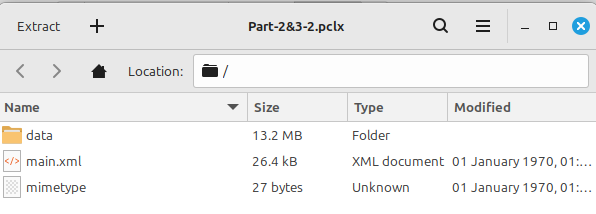
I save the project with the new filename initially before I make the insertion and then again after I done the insertion.
A problem which I have encountered is when I’ve inserted say 10 extra frames into an animation. When you’ve performed the frame moves, the timeline shows the frames in their new locations. But until you saved and reloaded the filename, for the frames within the Data directory, have not been updated. Thus if you create a new frame at a location on the Timeline previously used by a frame before the insertion. This frame will be wiped.
I always use a different filename for this save process, if my initial filename was Rat-5 I usually call the new file Rat-6. This means that I still have the unmodified file.